
My monitor was cutting my download speed by 75%
https://blog.tymscar.com/posts/studiodisplayethernet/At the start of the game after an update, BG3 compiles the (Vulkan) shaders. To avoid hammering the computer, it checks the load, including I/O pressure, and then throttles itself. It turns out that Ghostty uses io_uring, and even if it's not doing anything this somehow counts as pressure. This was made worse by the fact that I usually have a dozen or so Ghostty windows.
End result, BG3 compiles shaders using 1 core, throttled, instead of all available 20 cores. Instead of a minute or so, it'd take several hours.
(For closure: I configured ghostty to use epoll instead. Probably not optimal but works around the problem.)
> Somehow I am one of those few very lucky people to have the opportunity of owning a 2.5 gig symmetrical line for my internet.
I'm not going to complain against more bandwidth (as a GenXer I stared my online journey at (IIRC) 9600bps (maybe lower): much celebration with V.32/V.90), but I'm curious to know how many residential use-cases can take advantage of that much bandwidth. Linux ISOs?
How many services allow that much speed on a single stream / (TCP) session? Maybe you could have five at 500 Mbps?
Certainly downloading security updates or games may be quicker, but I would think that above 500Mbps (and certainly 1 Gbps) there would be major diminishing returns. Is anyone regularly getting close to that utilization in their daily work / hobbies (and not just a momentary spike on patch Tuesday)?
I think going from something like 100 Mb download to 1 Gb is slightly overrated. You hit heavy diminishing returns. Symmetric Upload, for me, is what really changes your quality of life a lot. Uploading a youtube video suddenly isn't an event, it takes a few seconds. Want to upload an image in any chat? Done before you consciously see it uploading. Heavy commits are instant, even with a bunch of resources. It changed my behavior. I started uploading more stuff to remote servers because the cost in time got so much lower.
I experienced this problem with a macbook and a thunderbolt dock. I had tried multiple different brands of docks and ethernet adapters, and various macbooks. One interesting thing I discovered is if I plugged a non-thunderbolt cable between the dock and the laptop, I would achieve full speed with no packet loss, so interestingly the issue doesn't occur over pure USB but only over thunderbolt.
This has got to be a bug on Apple's side right? Would be nice if they fixed it.
The latency added in the monitor is described as around 8 us, completely negligible compared to any Internet connection's latency.
So the latency without the monitor should be completely irrelevant.
"if the speed of the drain from my adapter to my Mac is half a gig slower than the speed of the input, then you can imagine the buffer getting filled more and more until it overflows. Those are dropped packets, which result in a hard backoff when the router resends them, so you drop loads in speed. And that’s the reason for all of this."
With diagram https://blog.tymscar.com/studio-display-ethernet/bottleneck....
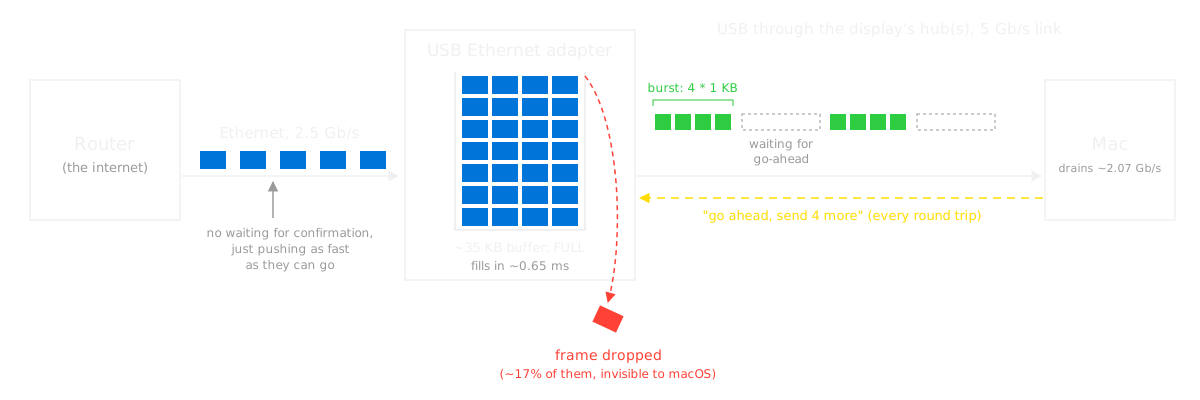
The monitor decides to send the adapter's packets on at only 2 Gbit/s, which leads to buffer overflow, thus packet loss, thus e.g. TCP congestion-control backoff.
The only thing we don't know is _why_ the monitor chooses to limit the bandwidth to those 2.07 Gbit/s (computed as the 41 KiB blocks per (7.6+8.2) µs). If it sent e.g. 81 KiB blocks, doubling the bandwidth, the problem wouldn't happen.
That'd be between Apple and the monitor.
It's explicitly not a bandwidth issue (that would also affect the SSD). It's a latency issue - the chip doesn't have a big enough buffer to keep sufficient packets in flight at once.
That's explicitly the opposite of what the author says.
"the speed of packets coming into the adapter is 2.5 Gbps. That’s what the router pushes in. The speed going out is around 2 Gbps."
Of course latency is always on the denominator side in the "bandwidth = data / time" equation, but it seems wrong to claim it's latency when it could also be improved by fixing the numerator; it's the entire fraction that's insufficient, thus bandwidth. As written:
"The reason is that if you add up the average time it takes to get the go-ahead through my monitor’s hub, which is around 7.6 µs, to the average time it takes to send 4 KB, around 8.2 µs, you can find what the maximum speed is"
And later, increasing the numerator is exactly what fixes it with the other hardware: "I can see that instead of sending 4 1 KB packets per burst, it would send 8!"
> the chip doesn't have a big enough buffer to keep sufficient packets in flight at once
How does this make sense? Even if his buffer was 100x larger, if the fill bandwidth exceeds the drain bandwidth, it'll eventually fill up. The article says that explicitly:
"Well, if the speed of the drain from my adapter to my Mac is half a gig slower than the speed of the input, then you can imagine the buffer getting filled more and more until it overflows."
"buffer" was perhaps a poor choice of words on my part, because "buffer" is ambiguous. In this case I am referring to the "transmit buffer", which is 4 in the non-working case and raised to 8 in the working adapter.
> Even if his buffer was 100x larger
"buffer" was perhaps a poor choice of words on my part, because "buffer" is ambiguous. In this case I am referring to the notional "transmit buffer", which is 4 in the non-working case and raised to 8 in the working adapter.
> "I can see that instead of sending 4 1 KB packets per burst, it would send 8!"
Increasing the number of packets in flight does not change the bandwidth, it only improves latency sensitivity (i.e. you can fire more data before requiring an ACK).
> it seems wrong to claim it's latency when it could also be improved by fixing the numerator.
Increasing the bandwidth without increasing the transmit buffer would not fix this issue. The adapter he ends up buying does both (allow 2x the packets in flight, and 2x the bandwidth).
The bottom line here is that the original adapter handles full duplex 2.5g when plugged into the laptop directly, and the SSD gets full duplex bandwidth in excess of 2.5g through the same intermediate link (i.e. the display), so both the adapter and the display have sufficient bandwidth. The added hop of latency however makes the short transmit buffer insufficient to cover the latency.
Sure we are talking about a different level in the networking stack and very different protocols. But with every component you add things get less synchronous. Well, no buffering needs to involved by the middleman, the mechanism for the throttling could also be different. What do I know...