Hacker News new | past | comments | ask | show | jobs | submit
I did, but I don't share the sentiment. Moved this year from macOS and KDE is over-engineered with little thought put into the UX. For example, try to take a screenshot. I was quite literally shaking my head for good couple minutes looking at this abomination. It's so extremely confusing, all over the place, bogged down with tons of switches, modes, it's like you need to spend 30 minutes to understand how this thing works and all the Whys. Took me couple days to realize it was an actual Photo app in its screenshot mode. If only they spent some of their increasing budget on some proper UX usability testing and not rely on their people's gut feelings and a "that'll do" mentality...

Meanwhile, Gnome just works exactly like you'd expect it to. I said it before already, but Gnome is for people moving from macOS and KDE is for ex-Windows veterans. And, for the record, I don't want to praise Gnome's overly-minimalistic approach, either, which too gets annoying when you have to find an extension for every stupid extra setting beyond the defaults. But, all in all, I much prefer it over KDE and wouldn't switch back. Not to mention the aesthetics, because there's no comparison if one shares the Apple/Braun ideals on design.

A plot twist here is that I am also a KDE app developer...

I just hit printscreen and save, I think you may be confusing your familiarity with a system with user friendliness.

For comparison, MacOS doesn't have a printscreen key, it's command-shift-3 or command-shift-4. Much more confusing to newcomers in my experience.

Spectacle used to just let you automatically save with no confirmation dialog, then they changed that a year or so ago. Maybe it's still possible to configure it but I was less than happy to have my default changed.
What Photo app are you referring to? On Debian Trixie, I just get the screenshot app, Spectacle. It shows the screenshot it just took, tells me where it’s been saved, lets me do stuff with it, and lets me take another one. It could do with a facelift, but it’s fairly clear, really. I wonder if they changed it later or if the distribution you used deviated from the defaults.
I believe they changed the app since Trixie was released (Trixie has KDE 6.3, the changes were in 6.4) and buried a lot of the really common settings behind menus. E.g. you might want to take a screenshot on a delay, and that's now hidden behind a menu whereas they used to surface the most common features on a panel.
I'm on Debian bookworm, and a screenshot is one Meta-Shift-S -- I just highlight the region I want to capture, and I get a dialog prompting me to (with one click) copy to clipboard, save to file, or annotate. There's a handful of out-of-the-way options as well, depending on what exactly you want to do. What's --- so abominable about that?
Why does it need a dialog? Just save the file AND copy it to clipboard. If user wants to annotate they can paste or go get the file.
I would be very annoyed if every screenshot I took was saved. I often take dozens of screenshots per day, and I save one maybe once a month. That means my screenshots folder only has meaningful entries. If everything was saved, I'd have to clean it up all the time.

There might be a small misunderstanding regarding the "dialog". Once you've selected an area you're shown the outlines & can still modify them, and the buttons (Accept (for further editing in Spectacle), Save, Save As, Copy, Export) are shown below those outlines.

This approach seems objectively superior to your suggestion.

loading story #47287628
loading story #47286061
It does. If you paste (to slack, email, whatever) after taking a screenshot on Gnome, you will attach your screenshot. It is also saved on ~/Pictures/Screenshots.
loading story #47287635
you can assign a shortcut to do just that?
OK, do me a favor and switch over to Gnome and try there. You'll see what I am talking about.
If Gnome made their screenshot feature an app then it would be possible to just use it on any other desktop too, as is usually a strength of Linux. And it would then also be possible to add it to Gnome's dock, which wasn't doable last time I checked.
I don't get how this can lead to confusion. You can hit PrintScr, draw a rectangle and hit save, or enter "screenshot" into the bottom left menu, rectangle, save. There you can also see the common options with shortcuts for "Full Screen" etc, at least on openSUSE Tumbleweed. I would assume that is the default behaviour.
The nice thing about Linux is that there’s a DE or WM for everyone. Personally I can’t imagine running a whole desktop environment when all I want is to draw some windows and a status bar. But, to each their own!
What are you talking about, spectacle is everything I want in a screenshot tool and I do not want it to be any other way. If you want something that just takes a picture then you might as well go back to 2012.
You can just change the screenshot program you use, it's a keyboard shortcut. Flexibility and customisation is the best reason to use Linux after all.
Except that's exactly my point. You come to that DE, you don't want to modify and optimize every single nook and cranny. I mean sure, some do, but this is a vast minority. If Linux is to become truly popular desktop, it needs DEs like Gnome, aiming at those who are just fine with all the defaults curated for them.
> If Linux is to become truly popular desktop, it needs DEs like Gnome

Linux has a DE like GNOME. How many DEs like GNOME does it need?

Yeah, and more DEs like GNOME will just take devs away from GNOME, and GNOME will regress. There aren't tons of avilable open-source devs who have the skill necessary to create a DE.

There's a lot of "we need this" "we need that" in the open-source world. But when you look at all the limitations objectively, we've already reached the highest point we can achieve.

Does Gnome have Desktop icons again by default? Because if not then no, it's not fine for people moving from Windows or Mac.
Or system tray icons or application menus. I have used GNOME since forever, but it became barely usable. You can bring back most functionality with extensions, but they are very buggy.
Or minimize and maximize buttons, which are BY FAR one of the most "basic" features desktop users expect?
What you're talking here is what I mentioned: Gnome maybe goes too far with removing some functionality, but I personally haven't used desktop icons in like 10 years and, based on current macOS trend, neither does Apple bet on it. But I am talking about overcluttering and overcomplicating UX, not oversimplifying it. Both things can be true and my KDE complaints are about the former, because I was responding to someone else praising it.

Your whataboutism doesn't invalidate my critique.
loading story #47289905
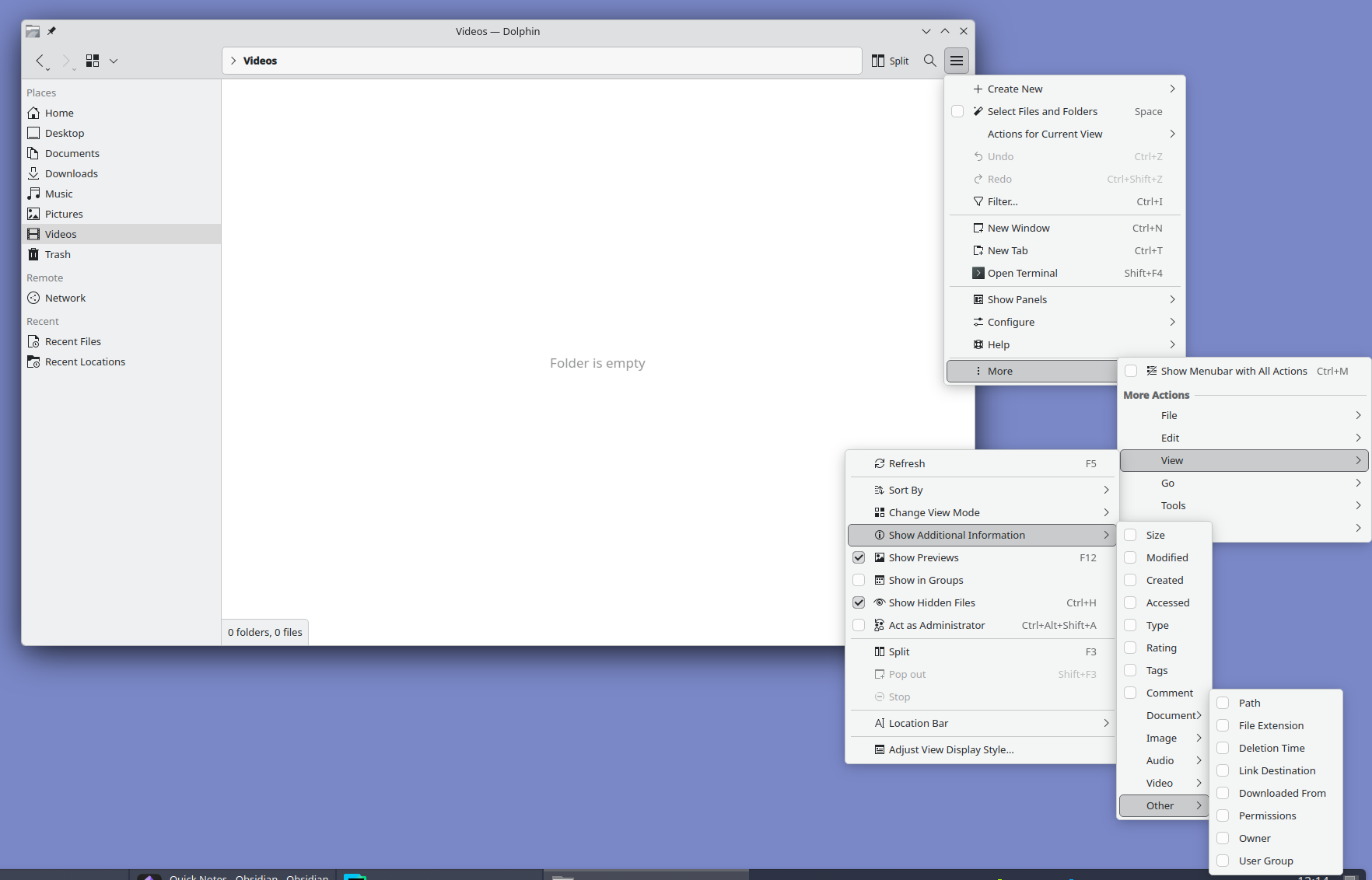
So you chose the outstanding screenshot utility to highlight the problems with KDE Plasma interface? Really? Why not something like this?: https://files.catbox.moe/uvxbea.png
{"deleted":true,"id":47283383,"parent":47283114,"time":1772846624,"type":"comment"}
I really like KDE plasma, it's the best DE out there once configured to mimick Gnome 2 / Mate, but I agree with you on screenshots! Also, Konsole required much configuration to be not way too busy.

Other than that I don't have too many complaints.

I am absolutely certain they're headed in the right direction, but even some minimal Usability Testing would give them tremendous amount information on all the low-hanging fruit they could fix/optimize and substantially improve the on-boarding for newcomers.